What Is the Moiré Effect?
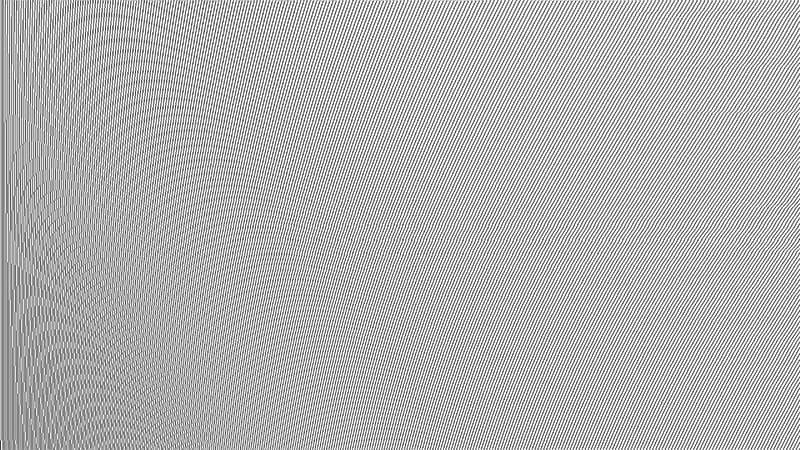
The Moiré effect (pronounced “mwah-RAY”) is a visual phenomenon that appears as wavy lines or false patterns in digital video. It typically occurs when a subject wears clothing with very fine or repetitive patterns, such as narrow stripes, small checks, or complex woven textures, which interfere with the camera sensor.
In essence, it is an optical interference between the pattern of the recorded object and the pixel grid of the camera sensor.
Origin of the Name
The term “Moiré” comes from French and originally referred to a type of fabric with a rippled or “watered” finish. In audiovisual contexts, the name was adopted due to the visual similarity between that textile effect and the distortions seen in video footage.
What Causes the Moiré Effect in Video?
This effect occurs when two repetitive patterns (the object’s texture and the camera’s pixel grid) conflict with each other, generating a third pattern that does not exist in reality. It is a form of visual aliasing.
Common causes include:
High-frequency patterns: Extremely fine details that match the scale of the camera sensor’s pixel grid.
Low-resolution recording: Lower resolution increases the likelihood of Moiré appearing.
Downscaling in post-production: Compressing or resizing high-resolution footage into a lower resolution can introduce these artifacts.
How to Prevent Moiré: Camera Settings
While the environment cannot always be controlled, there are several ways to reduce or avoid Moiré directly during shooting:
Use a camera with an anti-aliasing filter (optical low-pass filter): This softens fine details to prevent Moiré. Not all cameras include it, but many professional models do.
Shoot in high resolution: The higher the resolution (4K or above), the less likely Moiré is to appear.
Slightly defocus problematic areas: Softening a specific texture or garment can reduce the pattern without significantly affecting overall sharpness.
Change distance or angle: Moving the camera or subject can alter the pattern frequency and eliminate Moiré.
Use a wide aperture: A shallower depth of field can help blur problematic textures.
How to Prevent Moiré: Wardrobe Choices
If you are filming people, wardrobe selection is just as important as camera settings.
Wardrobe Tips for Camera:
Avoid small, repetitive patterns: Fine stripes, small checks, or patterns like houndstooth are highly prone to Moiré.
Prefer solid colors or large patterns: Solid colors are always safe, while larger patterns tend to cause fewer issues.
Avoid shiny or reflective fabrics: These can create both Moiré and unwanted reflections.
Do a camera test beforehand: Testing wardrobe on camera can prevent major post-production issues.
Can Moiré Be Fixed in Post-Production?
In some cases, yes—but results are not always perfect. Software such as Adobe After Effects or DaVinci Resolve offers tools to reduce Moiré, but they are not fully reliable. Prevention during filming is always the best approach.
Conclusion
The Moiré effect is a common but avoidable issue in digital video. By understanding how it occurs and taking precautions in both camera settings and wardrobe selection, filmmakers can prevent this visual artifact and maintain a cleaner, more professional image.
Planning a shoot? Always do a test in advance. A few minutes of preparation can make a significant difference.